Screenshots
See it before you download it
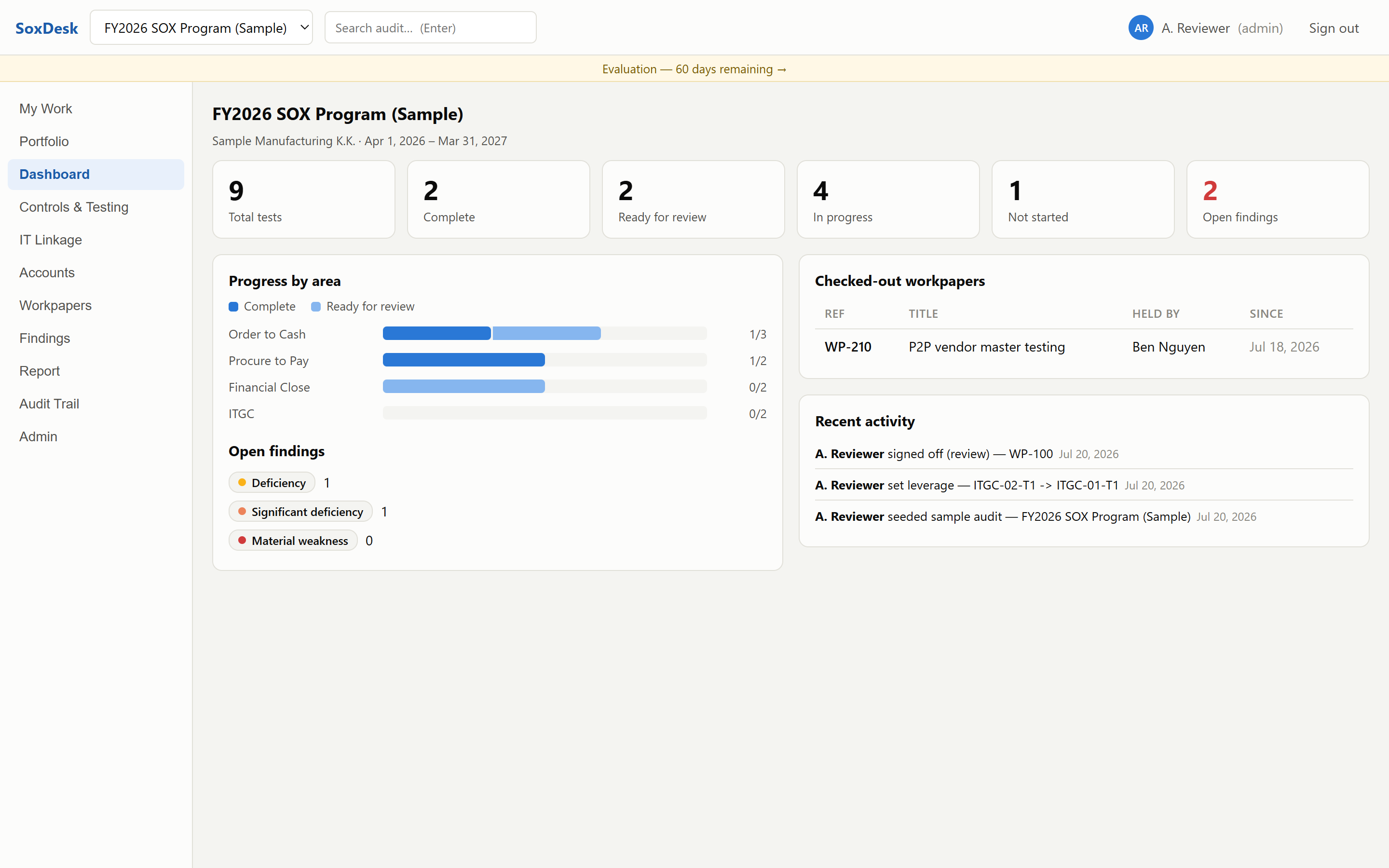
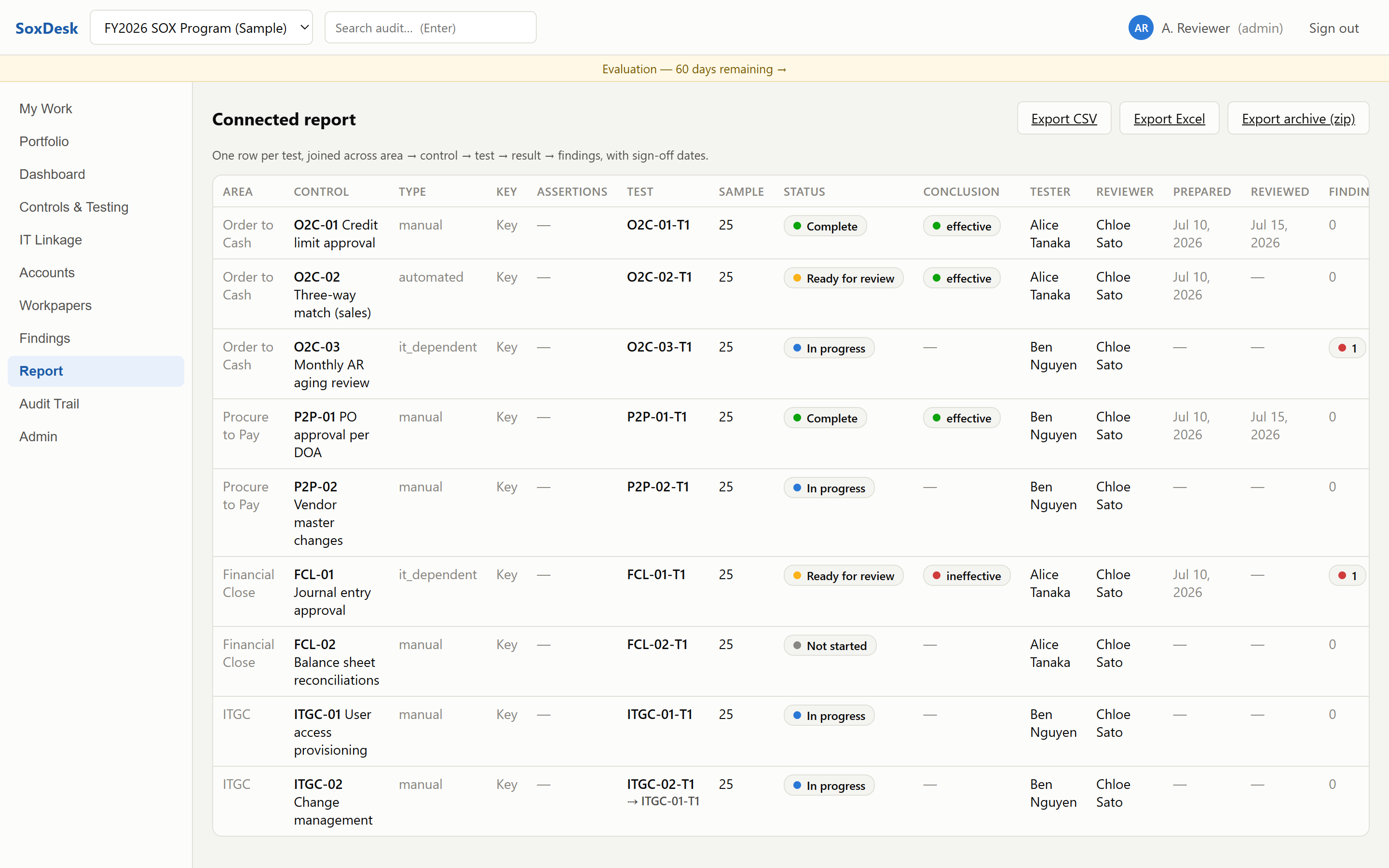
SoxDesk brings the workflow discipline of big-firm audit platforms to internal audit and SOX teams — and runs entirely on your own machines. The database is a file in a folder you choose — point it at a network share and your whole team works in one audit file. No cloud. No calls to us. Nothing for your IT security team to review except a folder.
The free 60-day trial is available shortly — no sales calls, no demos to book, evaluate at your own pace.
Adopting a cloud audit platform means a data-processing agreement, a security questionnaire, and months of procurement. SoxDesk is software you run yourself — there is no vendor holding your data, so there is nothing to review. It's an expense-report purchase, not a procurement project.
Workpapers, evidence files, sign-offs, and the activity log all live in one data-store folder on storage you control. The server binds to 127.0.0.1 by default and never talks to us. The only outbound traffic it can generate goes to systems you configure yourself: email through your own SMTP server, and webhooks to an endpoint you name.
No database server to stand up. Each team member runs SoxDesk locally and points the data store at the same shared folder — that's the whole deployment. The engine is tuned for SMB shares, with automatic rotating backups kept right alongside the data.
Not a GRC everything-platform — a focused workflow tool for the annual controls cycle: scope, assign, test, review, sign off, report.
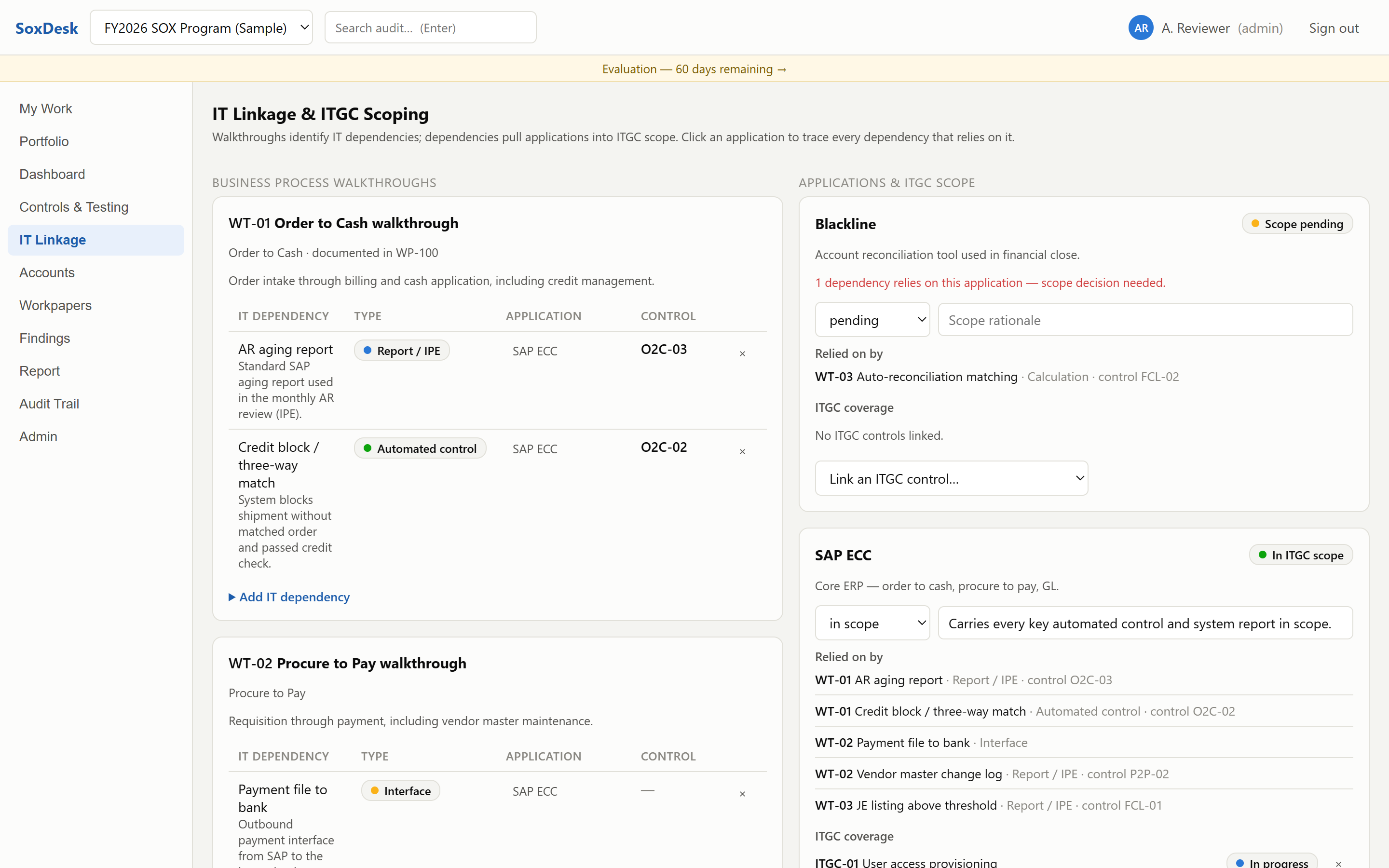
Business process walkthroughs identify IT dependencies (reports/IPE, automated controls, interfaces, calculations); dependencies pull applications into ITGC scope. Drill back in both directions — walkthrough to application, or application to everything that relies on it. In-scope applications with no ITGC coverage are flagged, and coverage rows show the live test status of the covering controls.
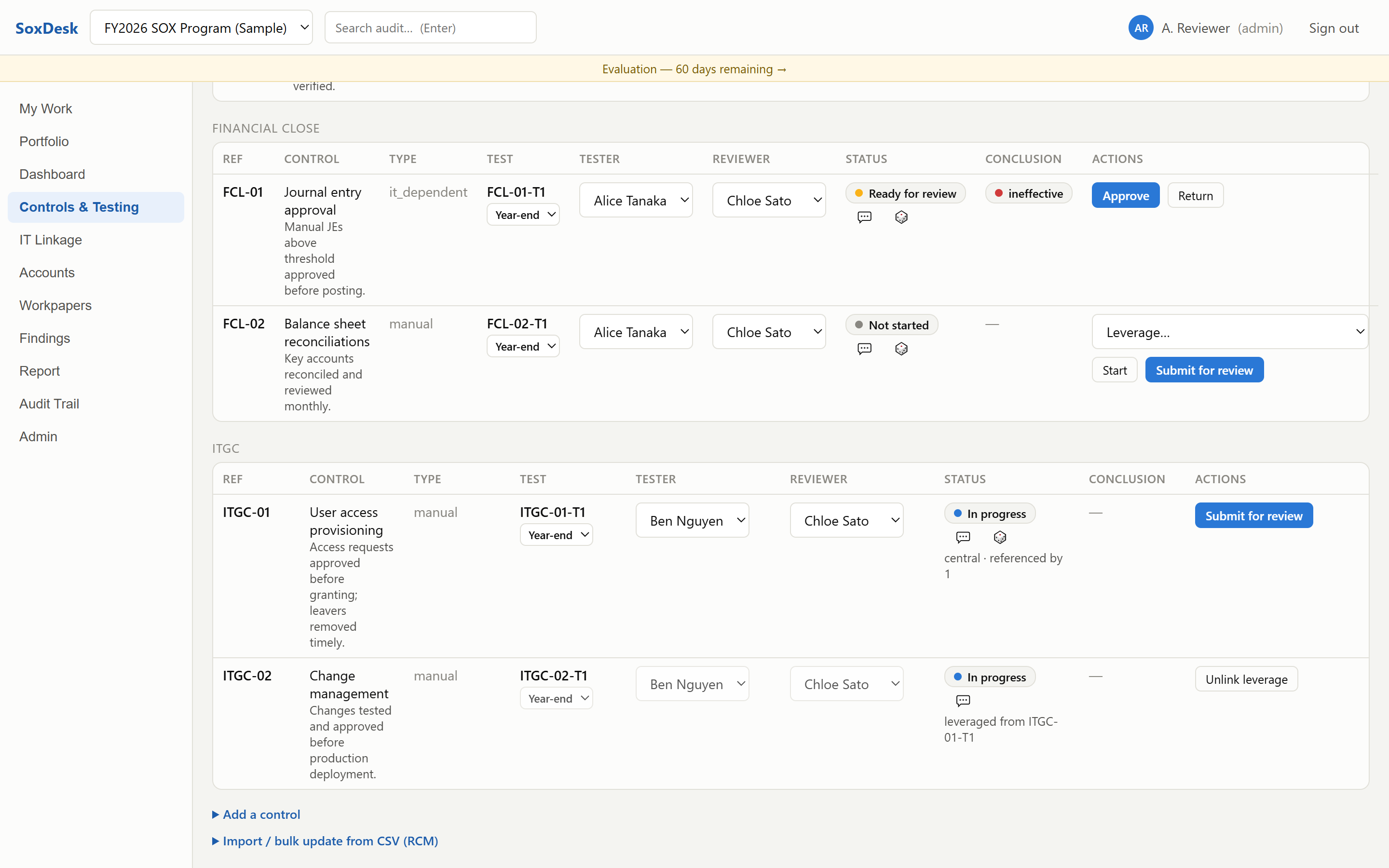
Point a control's test at a centrally documented test and it inherits status and conclusion everywhere — controls page, dashboard, and report — clearly marked "leveraged from". No more copy-pasting the same ITGC conclusion into forty controls.
Import your risk-control matrix from CSV. Preview shows exactly what a commit would do — because the preview runs the real import and rolls it back. Re-importing a maintained spreadsheet bulk-updates controls, tests, and assignments; empty cells never overwrite, and signed-off test content is never touched.
Submitted and completed tests are frozen. Reopening is an explicit, logged action by the reviewer or lead. Editing a signed-off workpaper — content or evidence — reverts it to draft and clears the sign-offs. Reviewer must differ from preparer, enforced server-side.
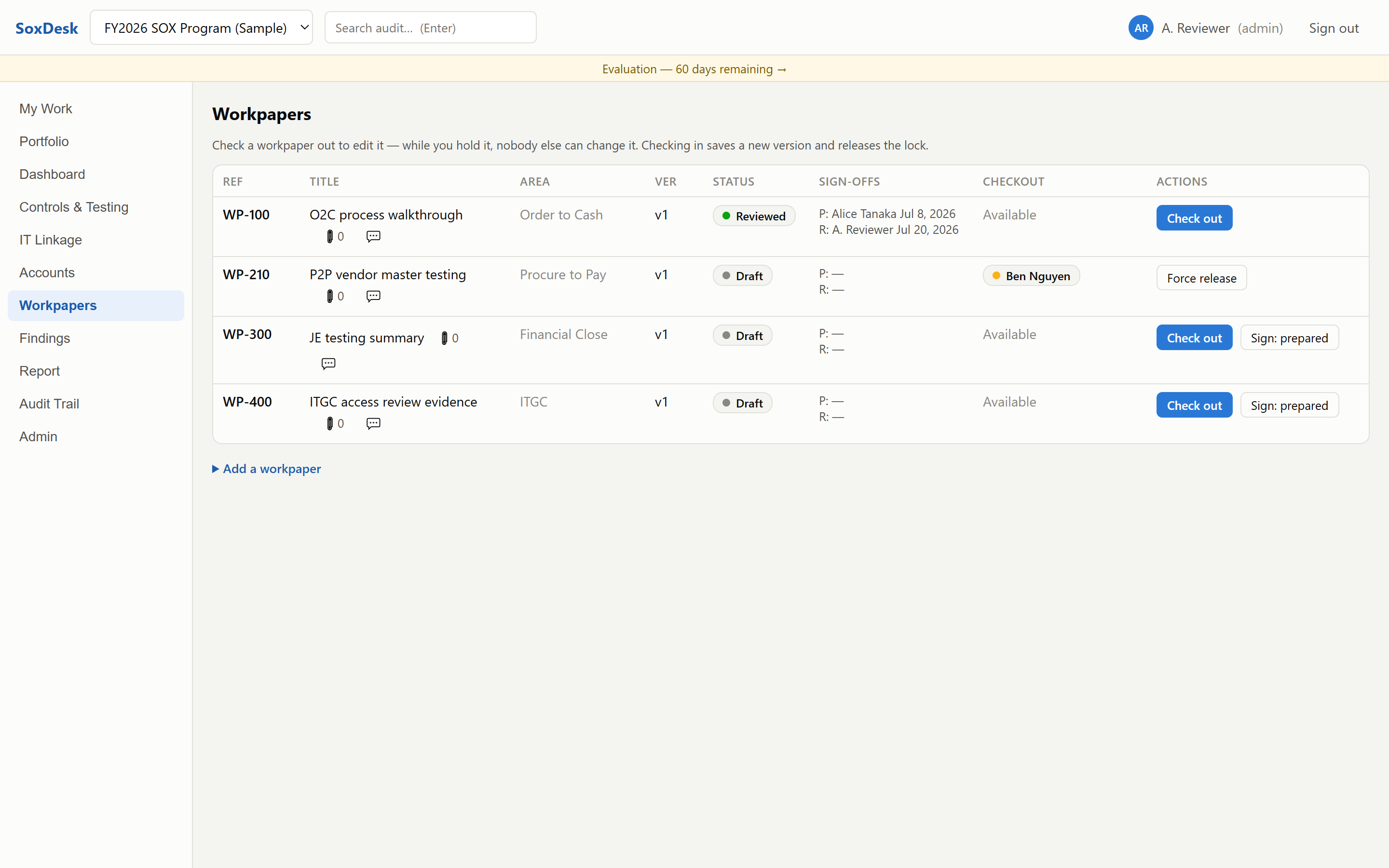
Check out a workpaper, work on it, check it in with a version bump — locks are server-enforced and atomic, so two people on the same share can't silently overwrite each other. Leads can force-release a stale lock.
Attach screenshots, PDFs, and extracts to workpapers. Files are stored inside the data store, so evidence travels with the share and lands in the archive zip.
Raise → address → clear review notes that block sign-off until cleared; suggested SOX sample sizes by control frequency with seeded, reproducible random selection; one-click prior-year roll-forward that carries structure, linkage, and workpaper content while resetting statuses and sign-offs.
A connected report (area → control → test → conclusion → findings) with CSV and Excel export, a one-click retention archive zip with sign-off stamps and evidence, and a filterable who-did-what-when activity screen.
The audit database is backed up automatically every 6 hours using SQLite's online
backup API — 14 rotating copies kept in the data store's backups folder.
Restore is a file copy.
60 days full-featured. After that, SoxDesk goes read-only — viewing, exports, and sign-in keep working, forever. License keys are verified offline with a signature check; the app never phones home.
There is no server project. Three steps, and the third one is just signing in.
Download the portable zip, unzip anywhere, double-click SoxDesk.cmd. The
app opens at http://localhost:5179 with a bundled runtime — nothing to
install, no admin rights needed.
On the Admin page, set the data store to a folder on your network share. Every team member's install points at the same folder — that's how you share one audit file.
An admin creates users; sign-in is your choice per deployment — local passwords (fully offline), one-time email codes through your own SMTP server, or your corporate directory (LDAP / Active Directory). No directory integration required.
Larger rollout, or control owners submitting evidence? Run one install on a small VM and everyone uses a browser — still no cloud. Both patterns are in the deployment guide for IT.
SoxDesk isn't for sale yet, and the price isn't final. When it goes on sale, the whole price appears on this page — no quote-gating, no "contact sales", no per-seat math, no enterprise tier that hides the number.
A no-questions refund window will apply, and licenses will be sold through Lemon Squeezy as merchant of record, so invoicing and tax handling will be standard.
The trial is the full product for 60 days. Unzip, run, click "Load sample SOX audit", and poke at it with realistic data. When the trial ends, your data stays readable and exportable — no lock-out, ever.
The free 60-day trial is available shortly.
Email us and we'll send you the download link the moment it's ready — the full product, no account required, nothing leaves your machine.
Email us to get the trialOpens your mail app. No mail app? Write to support@soxdesk.com with the subject “Notify me when the SoxDesk trial is available.”
Windows 64-bit · no installation · runs from any folder
No, with one exception you control: if you configure SMTP on the Admin page, sign-in codes and notification emails are sent through your own mail server. Until you do, codes appear in the server log and on the Admin page. License validation is a local signature check — the app never phones home, not even to verify a license.
Typically nothing beyond running an application and using a shared folder. The server binds to 127.0.0.1 by default, so it isn't reachable from the network; the database and evidence files live in a folder your IT already governs. We publish a one-page security overview written for exactly this review — send it to them as-is.
No. Sign-in can use local passwords — fully offline, no mail server involved. If you prefer one-time email codes or want email notifications, point SoxDesk at your own SMTP server (Exchange, or an application-relay endpoint); until then, codes are shown in the server log and to admins on the Admin page.
Automatically. The audit database is copied with SQLite's online backup API (safe
while people are working) on startup and every 6 hours, with 14 rotating copies kept
in the data store's backups folder. Since the whole store is just files,
your existing file-share backup also covers it. Restoring is copying one file back.
Trial expiry: the app goes read-only — sign-in, viewing, and all exports keep working, so your data is never held hostage. And whatever you pay for keeps working — that holds regardless of how licensing settles at launch, and your data stays readable and exportable either way.
You download a new zip and replace the app folder; your data store is untouched (it's a separate folder, and the app migrates its schema automatically on startup). There is no auto-updater and no update checks — you update when you choose to.
60 days, no questions asked. Refunds will run through Lemon Squeezy, which will be the merchant of record. Between the 60-day trial and the 60-day refund window, there is no realistic way to end up paying for something that doesn't work for your team.
SoxDesk is practitioner-built by someone who works in internal audit — an independent micro-vendor, not a venture-funded platform company. That's a trade-off, and we'd rather you know it: you get a focused tool, direct email support from the person who built it, and a product that can't strand your data even if we disappeared, because everything lives in files on your own storage and the license check works offline. You don't get a sales team, SSO, or a 24/7 hotline.
No. Support is email, answered by the person who built it — usually same or next business day, but no response time is contractually guaranteed. It is one auditor in GMT+7. If your procurement requires a contractual SLA, SoxDesk is not the right fit and I would rather say so now.
SoxDesk is designed for internal audit departments — teams of roughly 2 to 25 working an audit at a time — with server-enforced checkout locking and concurrency-tested writes against a shared store. It requires the shared folder to be reachable while you work (offline replica/sync is on the roadmap). If you're a 200-auditor global function with a dedicated GRC budget, a platform product is probably a better fit.
The intended model is one local install per user, all sharing a data store. You can bind the server to a LAN address with an environment variable, but the listener speaks plain HTTP, so we recommend keeping the default localhost binding or putting a TLS-terminating reverse proxy in front — the security overview covers this honestly.